The web editor for people who love the Mac. Espresso helps you write, code, design, build and publish delightful, fast websites — in an app to match. A seriously capable editor, amazing Live Preview with Browser Xray, visual CSS tools, Dynamo auto-building and Server Sync. And now LatteAI: an assistant that works across your whole site without a line of it leaving your Mac. All new for macOS 27, and every inch a Mac app.
Design and preview in Espresso, or with your favorite browsers. Xray and visual CSS tools for all. OMG.
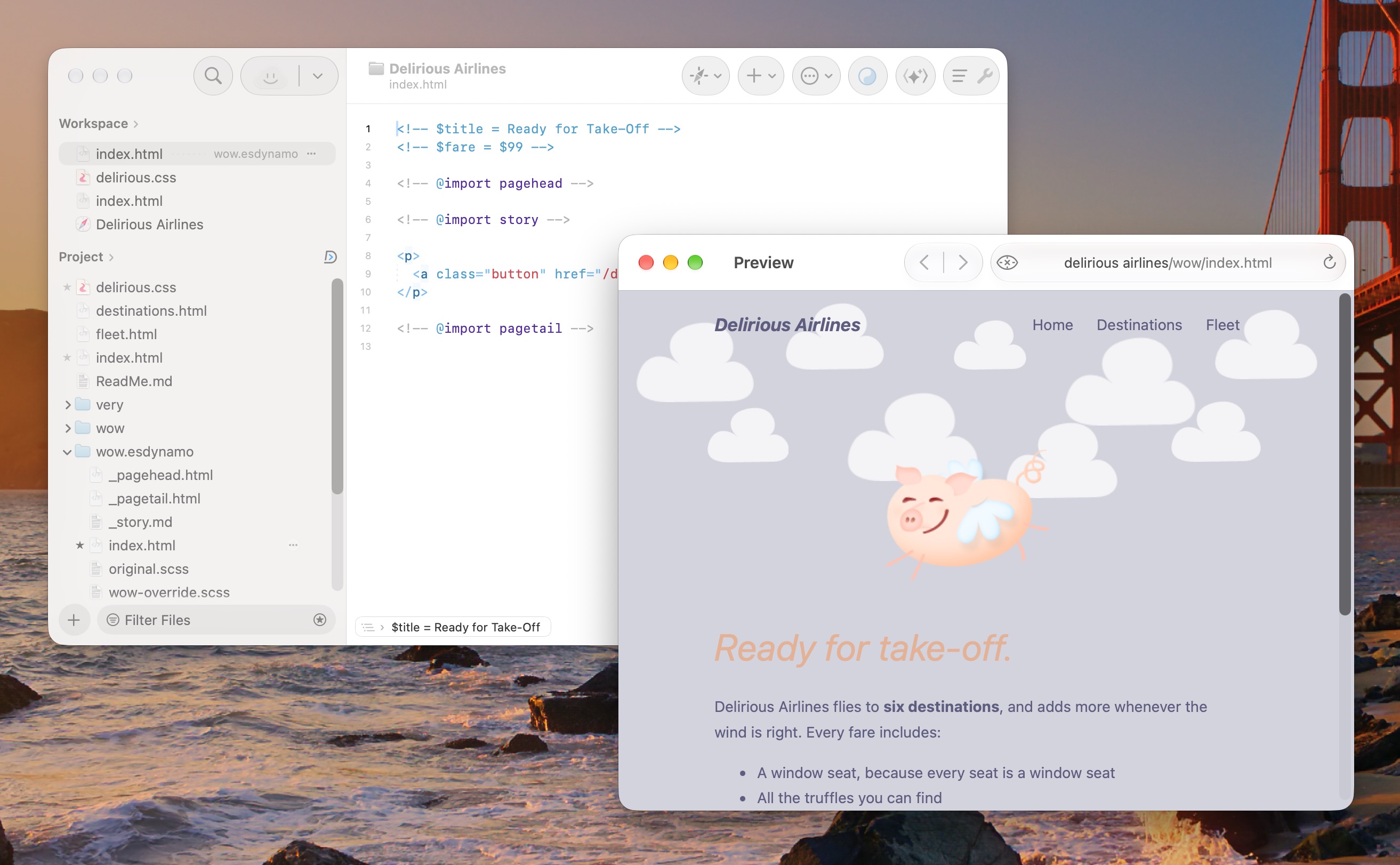
Browser Preview and Xray.
Local project? Enjoy the best auto-refresh in the business: your page keeps up as you type, no saving required. Xray your page layout to quickly edit relevant styles. The best part? It works in Chrome, Firefox and Safari (including Technology Preview).
Overrides with Live Styling and Xray.
Change CSS for live sites and see your design update in real-time. No need to publish, reload or even save. Only Espresso makes playing with live projects this fun, easy and non-destructive.
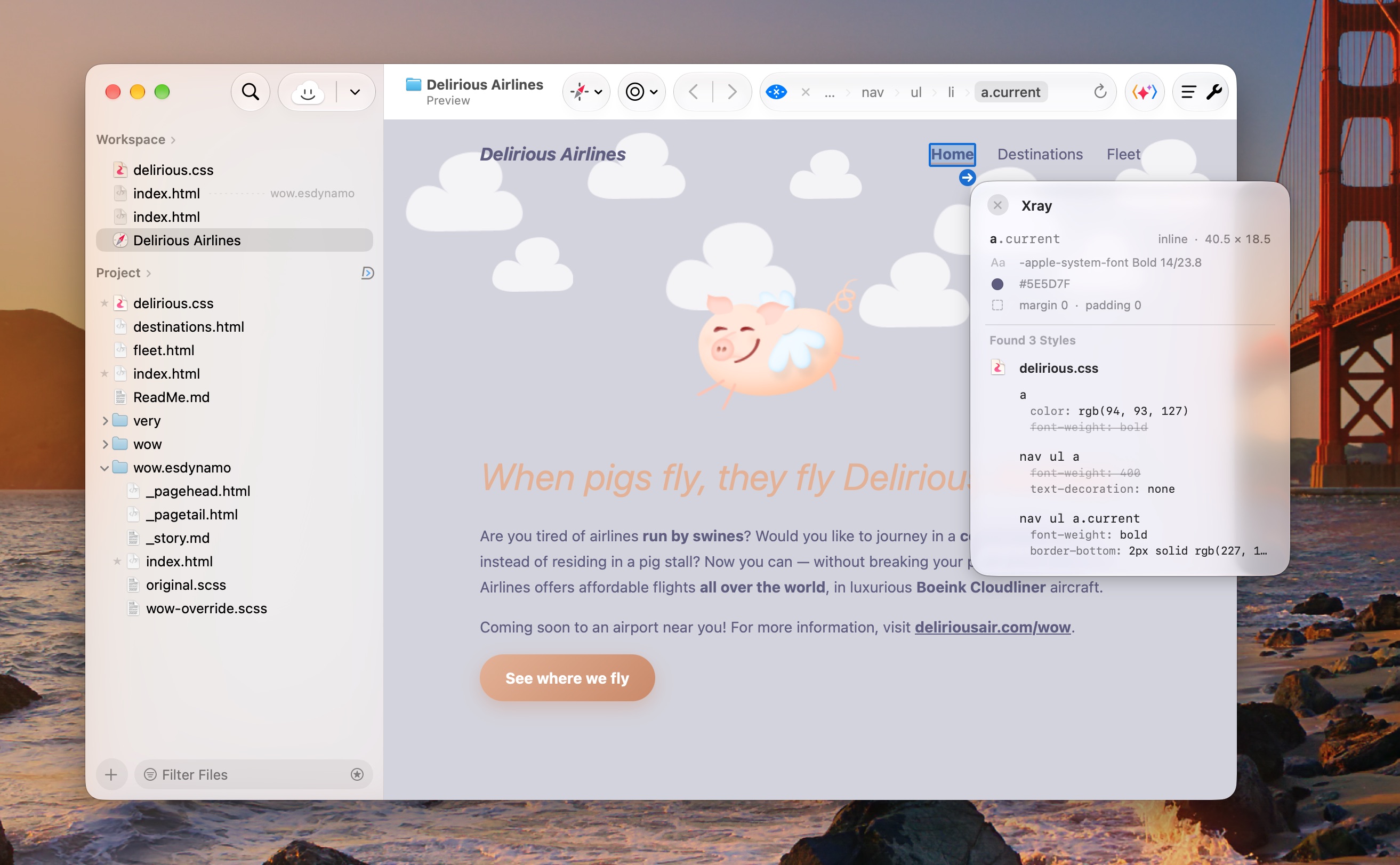
The Xray Panel Tells All.
Why is that heading purple? Click it. The new Xray panel shows the element's size, font, colors and spacing, then every rule that applies to it, what each one sets — and which declarations lost. Click a rule and you're standing on it in your style sheet, even when the source is SCSS or LESS. Still puzzled? Ask LatteAI about the element you just picked.
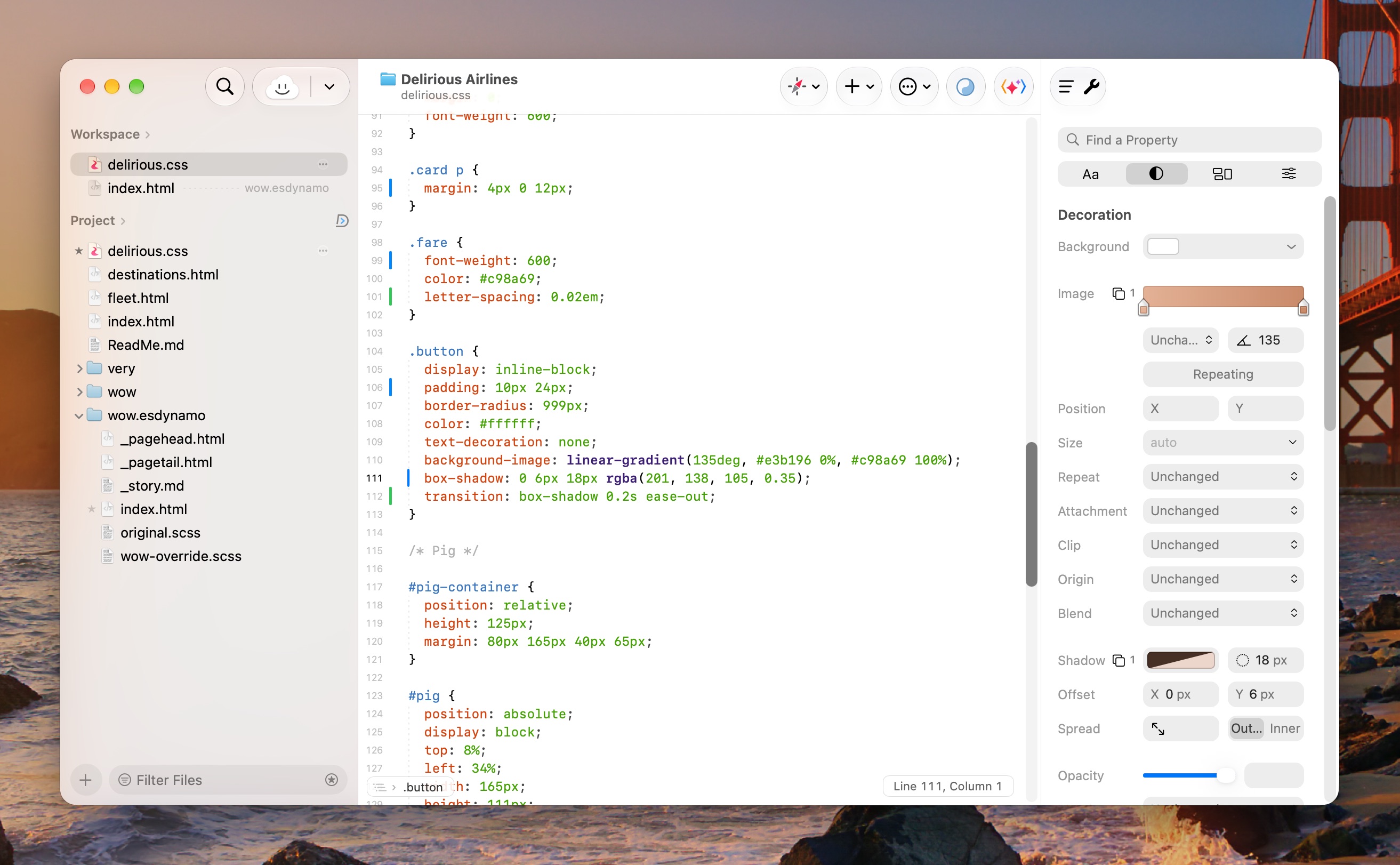
CSS Tools, Rebuilt for the CSS You Write Now.
Our award-winning CSSEdit visual tools live on inside Espresso, and they have never known more. Place a grid item by dragging across the grid. Pull the stops of a conic gradient. Draw an easing curve. Pick a variable from any field. Shadows, filters, transforms, transitions and keyframes are all a click away, and the inspector opens on exactly what your rule already sets. It works for CSS, SCSS and LESS, and it writes the way you do: your indentation, your color notation, your shorthands. Everything just works.
Say what you want. LatteAI builds it — right here, on your Mac.
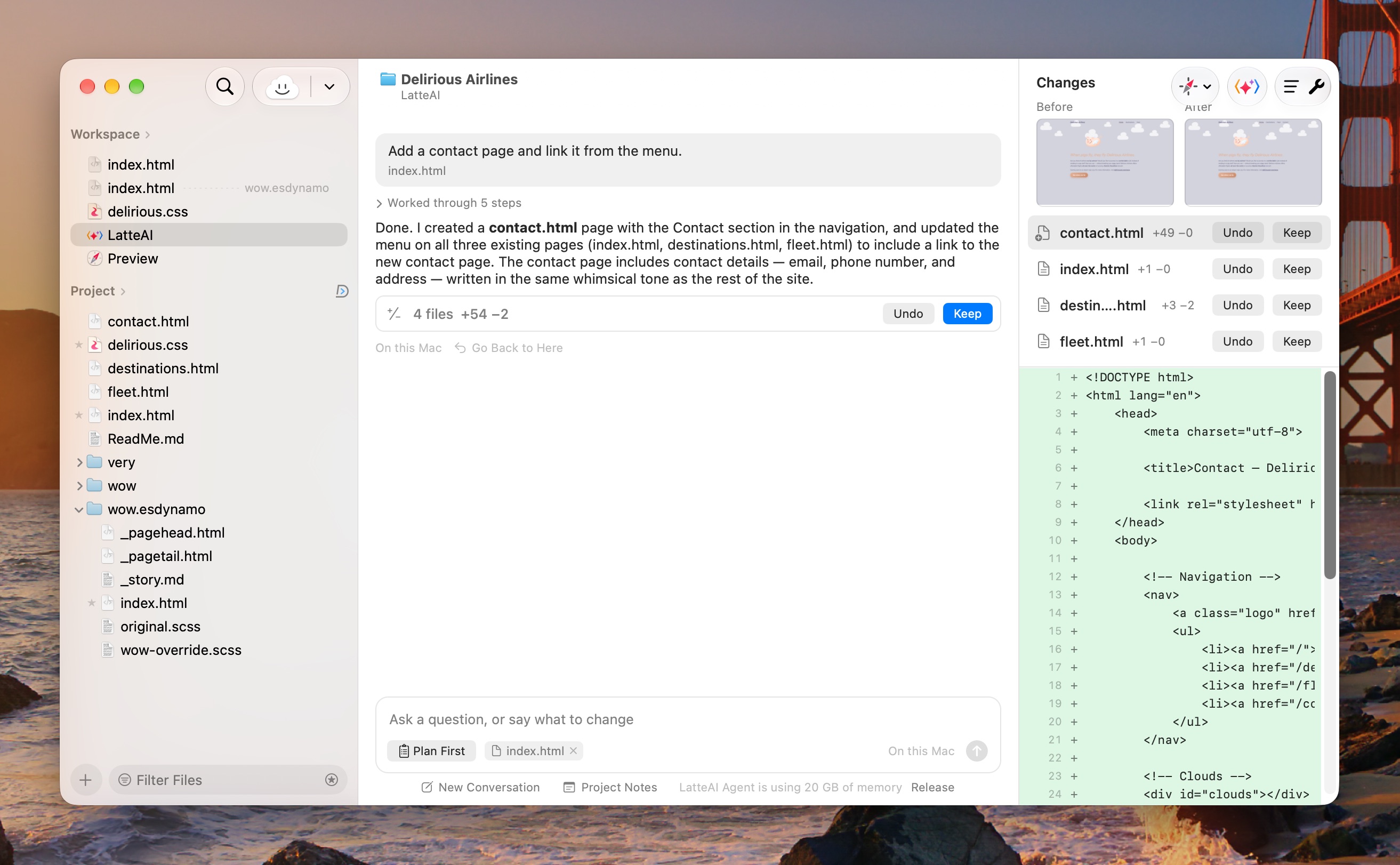
A Conversation That Does the Work.
“Add a contact page and link it from the menu.” That's the whole job. LatteAI reads your project, makes the changes across your files, looks at the result in the preview, and hands you every change: file by file, line by line, with before and after pictures of the page.
Private. Entirely.
LatteAI runs inside Espresso, on your Mac. No account. No subscription. No API key. No meter running. Your client's unreleased site stays exactly where it is: on your desk. Work on a plane. Work in a tunnel. Work for the client whose lawyers read contracts.
Suggestions as You Type.
Pause, and LatteAI finishes the thought in grey. Whole lines, written with the rest of your project in mind. Tab takes it.
Edit in Place.
Select, press ⌃Space, say what you want. The change lands in your document, marked in green and red. Return keeps it. Escape puts it all back.
You're in Charge.
Keep or undo each file. Rewind the project to any earlier message. See the plan first. And LatteAI never publishes: that button is yours.
A powerful text editor to rock your code, in a workspace that fits your workflow.
Multi Edit.
Type in ten places at once. Select the next occurrence, or all of them. Add a cursor above or below. Drag out a column.
Commands.
Run anything by typing a few letters of its name. Then give any command the keyboard shortcut you always wanted.
Changes.
See what's different from your last commit, right in the gutter. Click to put it back. Compare any two files side by side.
Lines.
Sort them. Reverse them. Join them. Strip the duplicates. Keep only the ones that match. Text wrangling, sorted.
Fantastic Find.
Needle and haystack no more. Project Find and Replace, saved searches and colorized regex. Select every match, or extract them all.
Outline and Path Bar.
Always know where you are. Hop anywhere with the outline, drop a bookmark, split the editor, and Go Back to where you just were.
Zen Snippets.
Zen shortcuts let you combine and expand abbreviations based on tags and custom snippets.
Toolbar Favorites.
Customize your toolbar with contextual actions, snippets and menus for quick access.
Re-Indent.
Bye bye, messy code. Apply custom spacing by example. Espresso follows each file's own indentation, and your .editorconfig.
Workspace.
Your open files in the sidebar, right beside your project. Prefer tabs across the top? Flip on the gorgeous new tab bar.
Open Quickly.
Switch between documents without taking your fingers off the keyboard. It's Go time.
Templates.
For files, folders or projects. Use a built-in one, or save your reusable bits. A real time-saver.
Solid Basics.
Zippy editing. CodeSense that knows your project's classes, ids and file paths. Folding. Bracket balancing. All there, quietly helping.
Never Lose Work.
Unsaved changes survive a crash, a power cut, a toddler. Open Espresso again and carry on where you left off.
Fifty-Odd Languages.
HTML, CSS, JavaScript, TypeScript, JSX, Vue, Svelte, Astro, PHP, Python, Swift, Rust, Go and many more.
Build fanstatic sites with Dynamo. Or just one file.
The Dynamics of Static.
We dig the inherently secure speed of static websites, and the convenience, reusability and flexibility in dynamic content systems. So, we started Dynamo: Espresso's built-in build infrastructure. It elevates the languages you know and love, producing content without server requirements. Nothing to install, nothing to configure, no terminal required. Opt in and discover auto-building with unrivaled Live Preview integration where you need it most.
Superb CSS.
SCSS and LESS are popular for their nested rules, variables and functions. Espresso has fantastic support, even when using them with Preview Overrides.
Markdown and HTML.
Reuse page components with imports and smart paths. Generate entire folders with template mixins (our news!). Learn more about advanced Dynamo features.
The friendly face of server supremacy.
Say Hello to Clodette.
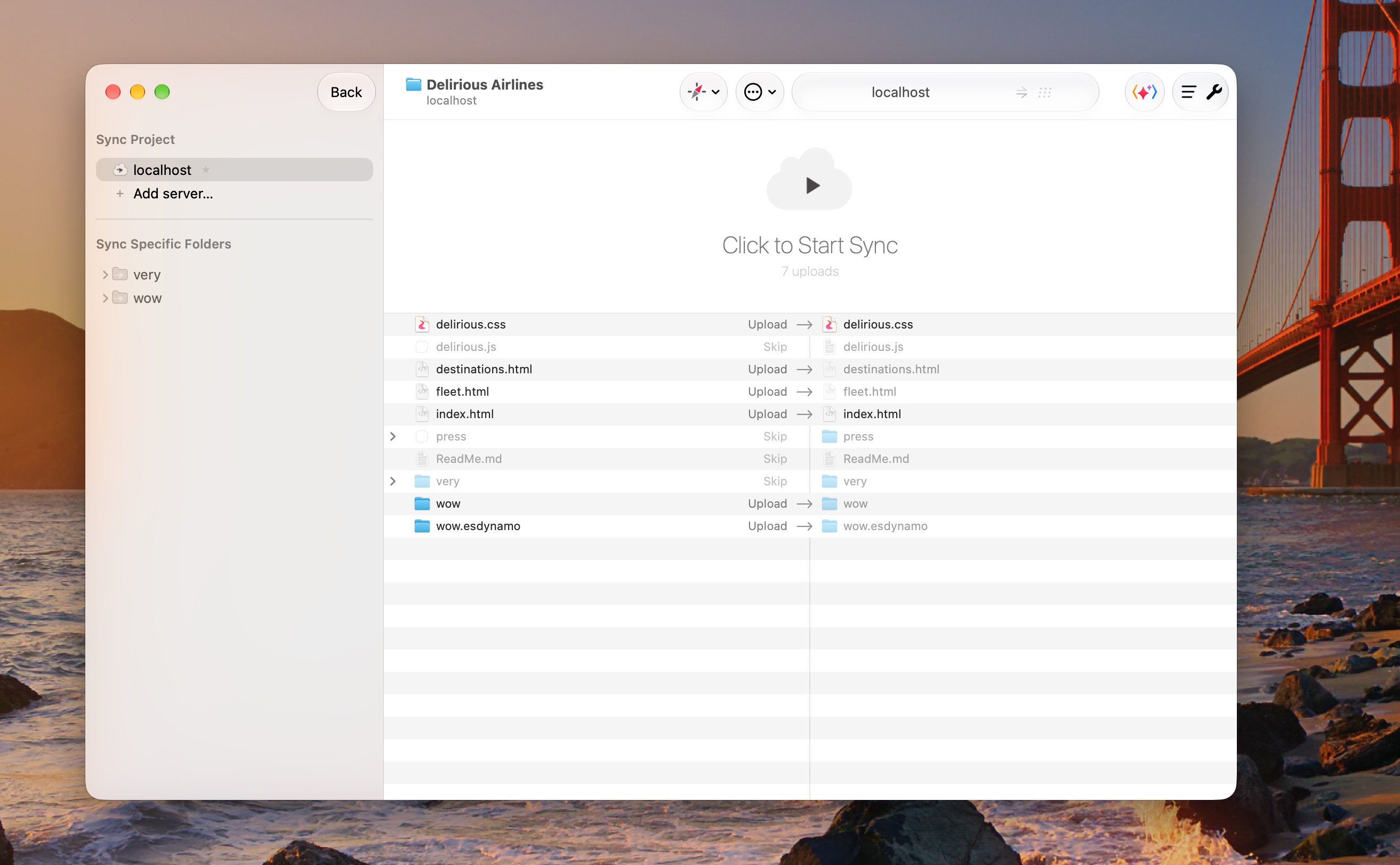
With Quick Publish, Server Sync and Browse Quickly, you have the right tools for all your publishing needs. Ready for action in the Clodette overview menu. SFTP, FTP, FTP with TLS and Amazon S3, all built in.
Server Sync.
Keep entire projects in sync with their server. Also pushing a specific folder to a CDN? No problem! Cloud Attack powers super-fast change detection and parallel transfers. Nothing is published until you have reviewed it.
App-Wide Favorites.
Server credentials are saved globally — or not at all, ideal for one-off transfers. Many sites on one server? One favorite can power multiple Project Servers, each connecting to its own folder.
Quick Publish on Save.
Introduced way back, auto-upload-on-save is still a goodie. Use the action menu for more manual control. All seamlessly integrated with your Project Servers — project-wide or folder specific.
Unapologetically Mac.
For developers, designers and power users who can tell the difference.
Not a Web Page in a Trench Coat.
Espresso is built for the Mac and nothing but the Mac. Real windows. Real menus, with every command in them. Real toolbars, sheets and popovers that behave the way your hands already expect. That's why it stays out of your way, and feels like it came with your Mac. Espresso has been a Mac app, and only a Mac app, since its very first version — and it shows in every pixel.
All New for macOS 27.
Redesigned from the toolbar down in Liquid Glass. A sidebar and inspector that step aside, and panels that float over your work.
Light and Dark.
Tutti Colori, Flat White, Dark Roast and Ristretto. Four themes that follow your Mac from day into night.
Your Keys.
Every command, any shortcut. Espresso works the way your fingers do, not the other way around.
Made for Apple Silicon.
Light on its feet, and happy in 8 GB of memory. LatteAI's models run on the chip in your Mac, not in a data center.
Yours.
Your projects are plain folders on your Mac. No lock-in. No cloud workspace. Your work stays yours, and stays put.
Batteries Included.
No extensions to hunt down. No config files to write. No build tools to install. Open a folder and go.
Everything comes in the box, so you're free to think outside it. Try today.
Espresso 27 requires macOS 27 and a Mac with Apple silicon, and runs well with 8 GB of memory.
LatteAI is optional: it needs a Mac with 16 GB, or 32 GB to make changes across a project.

 The web editor for people who love the Mac. Espresso helps you write, code, design, build and publish delightful, fast websites — in an app to match. A seriously capable editor, amazing Live Preview with Browser Xray, visual CSS tools, Dynamo auto-building and Server Sync. And now LatteAI: an assistant that works across your whole site without a line of it leaving your Mac. All new for macOS 27, and every inch a Mac app.